5-Step Guide to Using AI to Systemize Your Business
Turn AI from a Tool into an Operational Engine
Artificial Intelligence is everywhere right now.
Entrepreneurs are using it to write emails, generate social media posts, summarize documents, and brainstorm ideas.
But here's the real truth most people miss:
AI does not build businesses.
Systems do.
AI simply accelerates what already exists.
If your business is chaotic, AI will scale chaos faster.
If your business is structured, AI becomes one of the most powerful operational tools available.
The real opportunity is not using AI for content generation.
The opportunity is using AI to systemize your business.
When used correctly, AI can help you:
• Document processes
• Create Standard Operating Procedures (SOPs)
• Build templates
• Define workflows
• Improve team execution
• Reduce operational bottlenecks
In other words:
AI helps you move from reactive work → to operational leadership.
Here is a practical 5-Step Guide to Using AI to Systemize Your Business.
Step 1: Define the Outcome Before Using AI
One of the biggest mistakes entrepreneurs make is opening an AI tool and asking:
“What should I do?”
AI is powerful, but it needs direction.
Before using AI, define the specific operational outcome you want.
Examples might include:
• Creating a client onboarding process
• Building a sales follow-up system
• Documenting employee responsibilities
• Developing a marketing workflow
• Standardizing project delivery
Instead of vague prompts like:
“Help my business grow.”
Use structured prompts like:
“Create a step-by-step client onboarding SOP for a consulting business.”
When you define the desired operational outcome, AI becomes significantly more useful.
Think of it this way:
Clarity creates leverage.
Step 2: Map the Process (Even If It's Messy)
Most businesses already have processes.
They just aren't documented.
The goal is to capture the workflow that already exists.
Start by outlining the steps you currently take to complete a task.
For example:
Client onboarding might look like this:
Client signs agreement
Invoice is sent
Welcome email is delivered
Discovery meeting scheduled
Documents requested
Project folder created
Once you outline your real-world workflow, AI can help you turn that rough process into a structured operational system.
This step matters because:
AI works best when improving something that already exists.
Step 3: Use AI to Build the SOP
Now AI becomes incredibly powerful.
Once you have a basic workflow, you can prompt AI to turn it into a professional Standard Operating Procedure (SOP).
For example:
Prompt:
“Turn this workflow into a professional SOP with sections for purpose, scope, responsibilities, and step-by-step instructions.”
AI can quickly transform rough notes into:
• SOP documentation
• Training materials
• Team playbooks
• Workflow instructions
This dramatically reduces the time required to build operational documentation.
What used to take hours or days can now be created in minutes.
However, remember:
AI drafts the structure.
You refine the operational accuracy.
Step 4: Convert the SOP into Repeatable Templates
Documentation alone doesn't create operational efficiency.
Execution does.
The next step is turning SOPs into repeatable templates and tools your team can actually use.
AI can help you generate:
• Onboarding email templates
• Checklist templates
• Cask lists for project management tools
• Client communication scripts
• Meeting agendas
• Reporting frameworks
This is where AI truly becomes an operational multiplier.
Instead of reinventing the wheel every time, your business runs on pre-built operational assets.
Templates eliminate decision fatigue and create consistency across your organization.
Step 5: Operationalize the System
This is where most businesses fail.
They create documentation… but never implement it.
The final step is embedding the system into your business operations.
This means connecting your processes to the tools your team already uses:
Examples include:
• Project management platforms (Smartsheet, Trello, Monday)
• CRM systems
• Shared drives and folder structures
• Training documentation libraries
• Onboarding workflows
The goal is to make the process part of the daily workflow, not a document that sits in a folder.
This is the difference between:
Documentation vs. Operations
And it is the final step in the Optima Method framework:
Create → Optimize → Operationalize.
The Real Power of AI in Business
AI is not just a writing tool.
It is an operational accelerator.
When used correctly, it allows entrepreneurs to:
• Design systems faster
• Document processes efficiently
• Create repeatable templates
• Standardize execution
• Scale operations
Instead of spending years slowly documenting processes, AI allows you to build operational infrastructure in weeks.
And once your systems are in place, everything becomes easier:
• Onboarding clients
• Training employees
• Delivering services
• Scaling your business
Structure removes friction.
Final Thought
Most entrepreneurs try to scale effort.
Operational leaders scale systems.
AI simply helps you build those systems faster.
When you combine clear structure with AI capability, your business moves from:
Reactive work → to intentional operations.
And that is where real growth happens.
If you want to learn how to implement operational systems inside your business, follow along with the Optima Method — where we focus on one goal:
Creating structure that allows businesses to scale with clarity.
In Episode 5 of The Optima Method, Saskia breaks down how business owners can embrace AI as a practical tool for efficiency, clarity, and growth. If you’ve been feeling overwhelmed, behind, or unsure how AI fits into your business, this episode simplifies it.
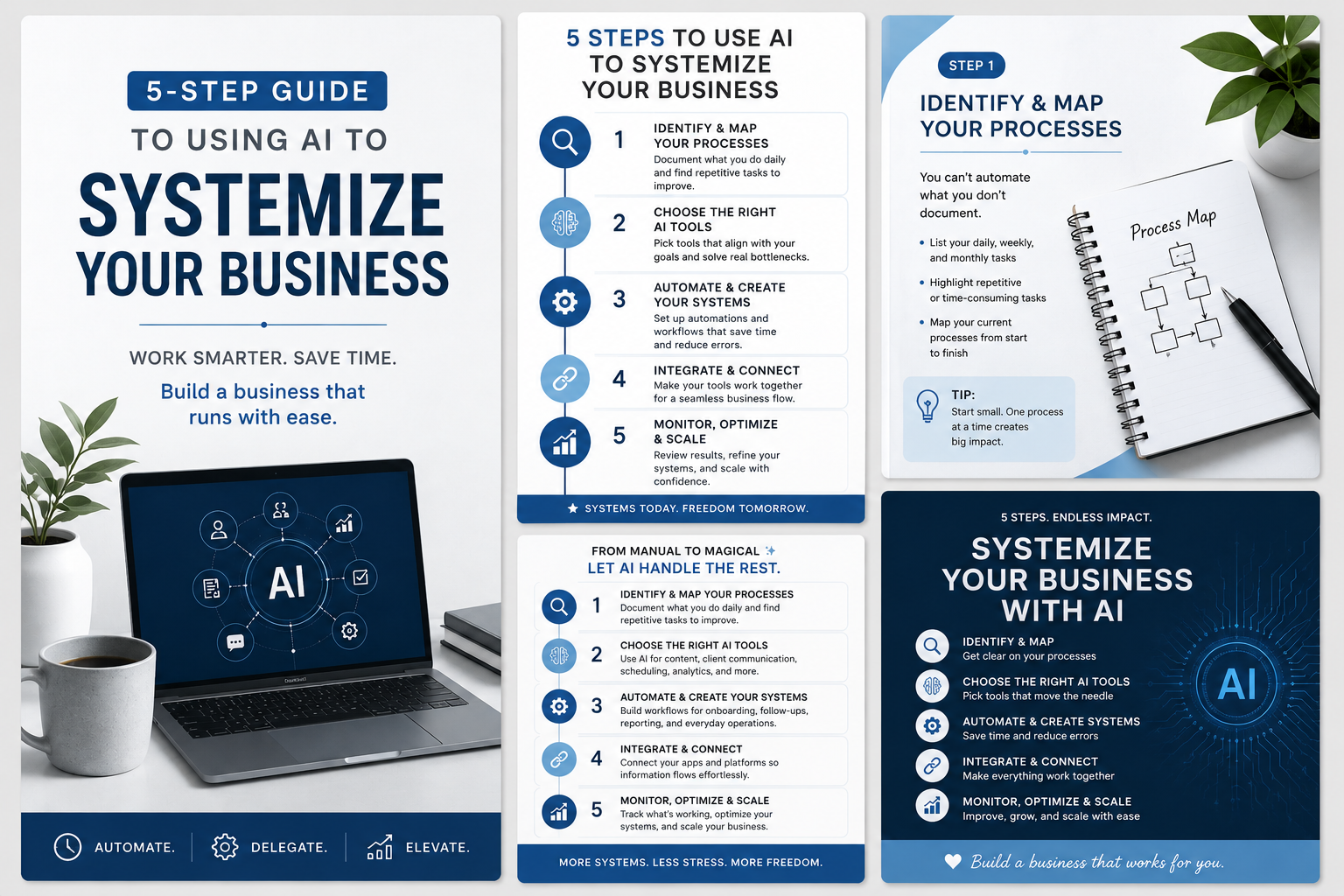
5-Step Guide to Using AI to Systemize a Business
Turn Artificial Intelligence Into an Operational Advantage
Most businesses are experimenting with AI.
But very few are using it to build real operational systems.
The 5-Step Guide to Using AI to Systemize a Business from Optima Operations Consulting is a practical framework designed to help entrepreneurs, business owners, and leaders move beyond basic AI use and start implementing structured operational systems that scale.
This guide walks through a clear, step-by-step approach to identifying the areas of your business where AI can eliminate repetitive work, improve efficiency, and strengthen decision-making.
Rather than focusing on trendy tools or quick hacks, this resource focuses on operational structure, helping businesses create sustainable processes supported by AI.
Inside the guide, you will learn how to evaluate your business operations, select the right AI tools, automate data workflows, and integrate AI into daily operations in a way that improves productivity across your organization.
What’s Included in This Guide
This structured resource walks through five key operational stages to help businesses successfully implement AI systems.
1. Identifying Repetitive and Time-Consuming Tasks
The guide begins by helping you identify recurring tasks within your business that consume time or are prone to human error. Examples include administrative work, scheduling, customer support, inventory management, and data entry. By identifying these operational bottlenecks, businesses can determine where AI automation will deliver the greatest impact. Optima Operations Consulting_5-…
2. Choosing the Right AI Tools and Platforms
Not all AI tools serve the same purpose. This section outlines how to evaluate AI platforms based on business needs and operational scale. It includes examples such as AI chatbots for customer service automation, AI-driven CRMs for lead management and forecasting, predictive analytics tools for planning, and AI content tools for marketing execution. Optima Operations Consulting_5-…
3. Automating Data Collection and Analysis
Data is one of the most valuable assets in any organization. This step explains how AI systems can automate data gathering, analyze trends, and generate actionable insights. Businesses can reduce manual reporting while gaining the ability to make faster, data-driven decisions supported by predictive analysis. Optima Operations Consulting_5-…
4. Streamlining Workflows Through AI Integration
The guide demonstrates how AI can be integrated into day-to-day operations to create seamless workflows across departments. Examples include automated email responses, AI scheduling assistants, and AI-powered project management tools that help teams track progress and allocate resources more efficiently. Optima Operations Consulting_5-…
5. Monitoring Performance and Scaling AI Systems
Successful AI adoption requires continuous improvement. The final step focuses on monitoring AI performance metrics, gathering team feedback, and refining workflows to ensure the system continues to deliver value as the business grows. Optima Operations Consulting_5-…
Who This Guide Is For
This resource is designed for:
• Entrepreneurs looking to scale operations
• Small business owners overwhelmed with manual tasks
• Operations leaders implementing new technology
• Consultants building structured business processes
• Teams seeking more efficient workflows
If your business feels reactive, inconsistent, or overly dependent on manual work, this guide will help you begin implementing operational systems powered by AI.

A simple, structured system to keep your week organized, focused, and under control.
If your week feels scattered, your tasks keep piling up, and you’re constantly trying to remember what needs to get done… this template gives you a clear, repeatable structure to stay on track.
The Weekly Checklist Template is designed to help you organize your priorities, track progress, and ensure nothing falls through the cracks—without overcomplicating your workflow.
What This Template Does
This checklist acts as your weekly control system—guiding you through what needs to be done, when, and how to stay consistent.
Instead of juggling tasks in your head or across multiple tools, you’ll have one place to:
Capture and organize weekly priorities
Track key tasks and responsibilities
Maintain visibility across your workload
Stay focused on what actually matters
What’s Included
✔️ Weekly priority checklist
✔️ Task tracking sections for each day
✔️ Space for notes, follow-ups, and reminders
✔️ Built-in structure to support consistency
✔️ Clean, easy-to-use format (no overwhelm)
Who This Is For
This template is ideal for:
Entrepreneurs managing multiple roles
Business owners juggling daily operations
Leaders tracking team or project deliverables
Anyone who needs a simple system to stay organized
If you’ve ever thought:
👉 “I know I have things to do, but I don’t have a clear system”
👉 “I keep forgetting tasks or missing follow-ups”
👉 “My week feels reactive instead of planned”
This checklist is for you.
The Outcome
When you use this template consistently, you will:
Stay organized and in control of your week
Reduce mental clutter and overwhelm
Improve follow-through and accountability
Create a repeatable rhythm that supports productivity
Why It Works
Because consistency beats complexity.
This isn’t about adding more tools—it’s about giving you a clear, structured way to manage what already exists.
Built the Optima Way
Designed using the Optima Method: Create → Optimize → Operationalize
So you’re not just tracking tasks…
You’re building a system that supports how you work.
Instant Download
Start using your Weekly Checklist Template today and bring structure, clarity, and consistency to your workweek.